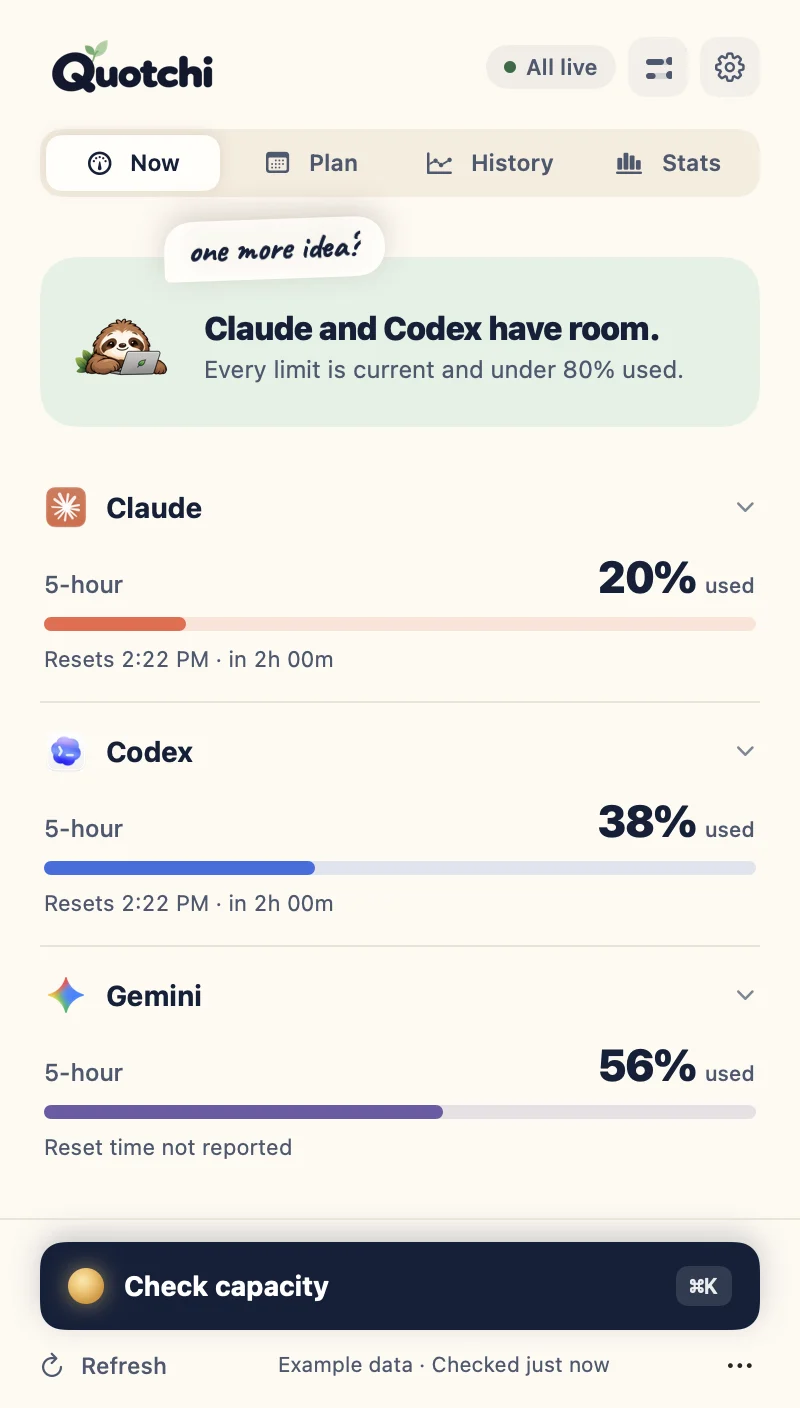
See how much Claude Code and Codex you have left, when it resets and which tool still has room. Gemini app usage too, if you want it. All from your Mac menu bar.
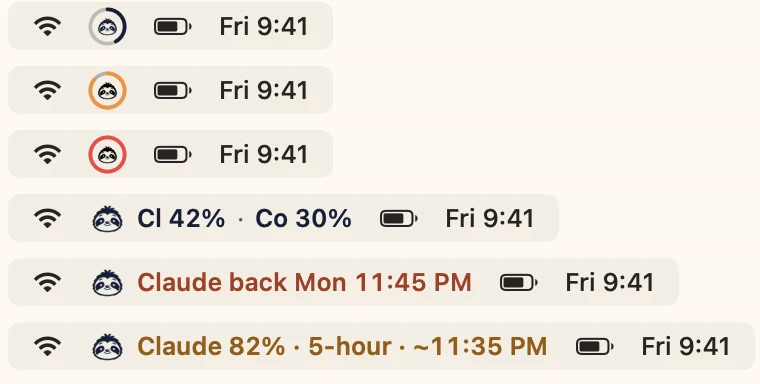
One sloth, three moods. One glance at the menu bar tells you whether to start that big refactor or keep it small.
Claude 32%
Room to build
Every window is under 80%.
Start the big refactor.
Codex 82%~3:40 PM
Getting close
A window passed 80%, and you can see when it would run out.
Keep the next task small, or switch tools.
Codex back Mon 12:17 PM
Limit reached
The menu bar shows when it’s back, not just 100%.
Switch to the tool with room. Quotchi can ping you at reset.
“I’m not lazy. I’m rate-limited.”
Your menu bar, your way
Glance, don’t read.
A ring that fills up and turns amber, then coral.
Two tools at once, for parallel builders.
The reset time instead of 100%, the moment you hit a limit.
“~3:40 PM” when you’re on pace to run out. Opt-in.
Plus small, medium and large widgets.
Example readings
Why not just /usage?
One glance beats four terminals.
/usage and /status are great, inside one session, for one tool, when you remember to ask. Quotchi keeps the answer in view.
/usage · /statusQuotchi
Claude Code, Codex & GeminiOne tool at a timeSide by side
Always visibleType a commandMenu bar & widgets
Heads-up before you run dry—At your warning level
“Should I start the big task?”You do the math“Codex has room”
Ping me when it’s backKeep checkingOne-tap reminder
Your promptsStay with your toolNever read
Inside the app
Everything you need, nothing you don’t.
See each tool’s usage and when it resets. Missing limits and older readings stay labeled.
Free · Now
~/next-idea — zsh
$ quotchi can-i
Claude is out until 2:30 PM. Codex has room.
$ quotchi wait claude && claude -c
waiting for Claude’s 5-hour limit… back 2:30 PM
▍
Opus~/next-ideaClaude 5h 42% · wk 61% · Codex 30%
For terminal people
Right where you type.
One switch adds your limits to Claude Code’s status line, with Codex alongside. Your existing status line keeps working, and switching it off puts everything back.
quotchi can-i and quotchi wait for scripts and agent queues
⌃⌥Q opens Quotchi from anywhere
quotchi:// links, Shortcuts and a status file for Raycast & SketchyBar
Your building, in numbers
Your tokens. Your models. Your little story.
See your local token totals, find your leading model and make a card worth sharing.
Token traffic
3M
includes cache
Leading model
Opus 4.6
by token traffic
Sessions
84
reported
Totals and a Field Notes card are Free. Pro adds deeper exploration and custom card styles.
What these stats include
Local records, not whole-account billing. Claude reports token traffic including cache; Codex model counts describe chats. Gemini token stats are unavailable. Stats are optional and stay on your Mac.
a little story worth sharing
Free Field Notes · real export with example data · yours to share
Your prompts are none of our business.
No prompts or transcripts. Quotchi never reads what you send your tools.
No Quotchi account. It uses the sign-in your tools already have.
Local by default. Optional history and Stats stay on your Mac.
For people running more than one session: know which one is waiting on you, watch more than one account and see what your plan is worth.
Keep your limits close.
Float Quotchi beside your editor, or tuck it into a screen-edge tab.
Know your patterns.
See when you burn through a window, when it resets, and the hours you usually run hot. Saved on your Mac, only if you turn it on.
Know your model mix.
Which models you lean on, and when. From your own local records.
Claude Code sessions1 waitingapi-serverNeeds your permission1mquotchiPaused · back 10:45 PM10mlanding-pageWorkingnow
Know which session needs you.
See which Claude Code session is waiting on you, which one the limit paused, and get a nudge when you can resume.
API value this weekEstimate at list prices≈ $109Your week at API pricesMax 5x, per weekapi-server $38 · landing-page $29 · quotchi $21
See what your plan is worth.
An API-equivalent estimate per project folder. Not your bill, just the fun number.
Also in Pro
👥More than one accountWork and personal, side by side
🧭Weekly plan coachOne tip from your own patterns
🌙Quiet hours & digestsNo pings while you sleep
⏱️Work blocksSee what a session cost you
🎨Card themesIncluding “My week with AI”
📈Recent paceExperimental run-out forecast
Pricing
Free for the everyday. Pro for the bigger picture.
Free
A clear view of your limits, every day.
$0forever
Claude Code & Codex limits, resets & “which tool has room”
Optional Gemini app usage
Ring, two-tool & reset-time menu bar
Setup check & the quotchi command
Alerts at your own warning levels
“Notify me when it’s back” reminders
“At this pace” run-out estimate
Native macOS widgets
Weekly API-value estimate
Local token totals, leading model & a Field Notes card
Data export & deletion controls
← less than one rate-limit headache
Launch offer
Pro ✦
Understand your patterns and make Quotchi yours.
$5Regular price $19opening batch · pay once
Launch offer · first 50 licenses, then $8
Everything in Free
Local history, comparisons & work blocks
Quiet hours & usage digests
Floating & screen-edge companion
Know which session needs you & when to resume
A weekly plan coach
Watch more than one account (read-only)
API value per project & deeper Stats
Pro checkout isn’t open yet. Start with Free today; Pro unlocks inside the same app, nothing to reinstall.
Yours for life.
Pay once
All future updates
2 Macs
7-day refund
How launch pricing worksLaunch prices
250 early-price licenses in five batches of 50: $5, $8, $11, $14 and $17. After that, $19. Every batch gets the same lifetime Pro license; only the price changes.
Opening batch$550 licenses
Following batch$850 licenses
Following batch$1150 licenses
Following batch$1450 licenses
Following batch$1750 licenses
Regular price$19Then ongoing
Availability
Launch prices are listed above. Live availability appears when checkout opens.
One-time prices in USD. Your price and any tax are confirmed at checkout. License & refunds
Quotchi is built for Claude Code and Codex: usage, reset times and which tool has room. Signed out of Claude Code? Quotchi can also read your session and weekly limits from the Claude app’s Settings → Usage page (optional, needs Accessibility access). Gemini works too: Quotchi can read usage from the Gemini Mac app once you turn it on. Turn on its reader, allow macOS Accessibility access and keep Gemini’s English Usage limits pane open. You get usage only: no reset times, token stats or Gemini CLI usage. Check supported versions.
Does it collect my prompts?
No. Quotchi doesn’t collect prompts, responses, projects or transcripts. Optional history stays on your Mac.
How do I get started?
Download Quotchi for your Apple silicon Mac (M1 or later) running macOS 14 or later, follow the three welcome screens and choose your tools. Intel Macs aren’t supported. Installation guide.
Is Pro a subscription?
No. Pay once for a lifetime license on two Macs, with all future Pro updates included. License details.
How do I unlock Pro?
After purchase, import the signed license file in Quotchi → Settings → Pro. Keep the original file to restore access or use it on your second Mac. Activation and recovery.
Basic local totals, your leading model and a Field Notes card are Free. Pro adds deeper exploration, saved trends and custom card styles. These summarize local records, not whole-account billing.
Does it work inside my terminal?
Yes. Turn on “Show limits in Claude Code’s status line” in Settings → AI tools. Quotchi backs up your settings, keeps any status line you already use, and can remove itself cleanly. You can also install the quotchi command: quotchi can-i answers whether a tool has room, and quotchi wait claude waits until a limit is back. A global shortcut (⌃⌥Q) opens the panel.
What if Quotchi can’t read a tool?
The built-in setup check tells you exactly what’s missing (not installed, not signed in, or an unsupported version) with one command you can copy to fix it. Quotchi never asks for your password or API key.
Can it predict how long I can code?
Roughly, never as a guarantee. The Free “At this pace” estimate shows when a limit would run out if you keep going like this. Pro adds Recent pace, an experimental look at your saved readings.
build more. worry less.
Meet your building companion.
A calmer view of your limits and a little more room for your ideas. Start Free. Go Pro whenever you like.
 Example

 Claude Code
 Codex
Codex Gemini

 Is my Claude plan worth it?
 Reset time calculator
 Status line generator
 What kind of AI builder are you?